
Install the Script Tag
Add the Beag.io script tag to protect your SaaS with authentication.
Go to Your SaaS Detail Page
On the “My SaaS” page, click on your app to see its details. After adding your SaaS info and plans, find the “Script Tag” button and click it.
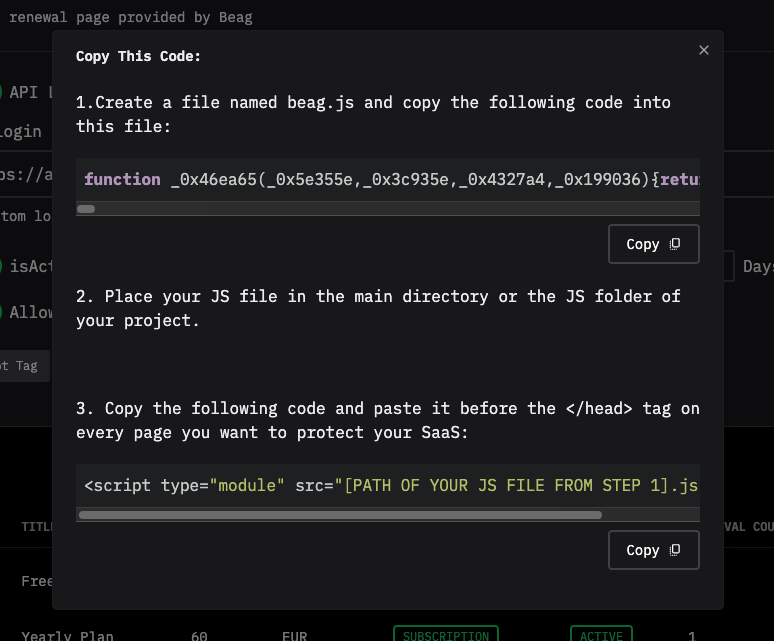
Follow the Instructions
Beag.io will show you a special code to copy.
- Make a new file called
beag.json your computer (you can use a simple text app like Notepad). - Copy the code from Beag.io and paste it into
beag.js, then save the file.
Using Cursor? Here’s an easier way!
Tell Cursor this:
- Create beag.js file in public/js directory. Don’t need to insert anything in the file.
- Copy this code and paste it before the
</head>tag on every page. Don’t convert it to<Script>:<script type="module" src="js/beag.js" defer></script>
Cursor will make beag.js for you! Then, copy the code from Beag.io and paste it into beag.js.
Add the Code to Your App
- Open your app’s pages in a text editor.
- Find the
<head>part of every page you want to protect (it’s near the top, before</head>). - Copy this line and paste it right before
</head>on those pages:
<script type="module" src="[PATH OF YOUR JS FILE].js"></script>Replace [PATH OF YOUR JS FILE] with where you saved beag.js (e.g., if it’s in a folder called js, use js/beag.js).
Using Next.js? Special Step!
If your app uses the Next.js framework, add defer to the script tag like this:
<script type="module" src="[PATH OF YOUR JS FILE].js" defer></script>Why? Without defer, your app might get confused and show an error because Next.js loads things in a special way. Adding defer tells it to wait a little so everything works smoothly!
See the Magic!
When you’re done, visit your app’s page. If you’re not logged in, it’ll send you to the Beag.io login page to keep your app safe!
Tip: This script tag is like a magic key — it locks your app so only the right people can get in!