
Set Up Plans to Sell Your MVP
Create subscription plans with Stripe payment links to monetize your SaaS.
Add Your Plans
On the SaaS Detail page, click “Add Plan” after adding your SaaS info.
- Enter title, description, amount, and currency you want.
- Choose a subscription period: monthly, yearly, or whatever you like!
- Beag.io will create products in your Stripe and give you buy links for each plan.
Add a Free Trial (Optional)
Want to give people a test run? Pick how many days (e.g., 7 days) for a free trial!
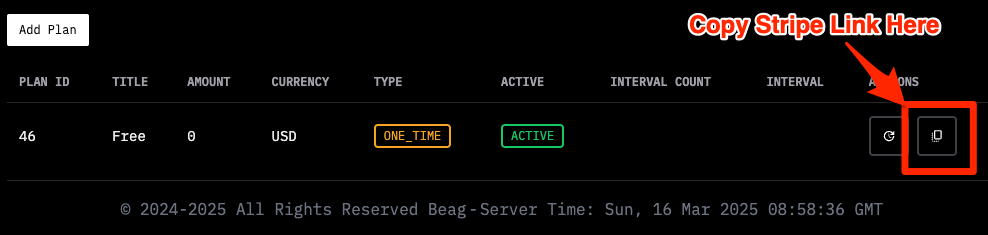
Get a Stripe Payment Link
Use the Links
Put the buy links on your pricing or renewal page (Beag.io makes these pages, or you can use your own).
When people click, they’ll pay through Stripe.
Tip: More plans mean more ways for people to buy — make it fun for them!